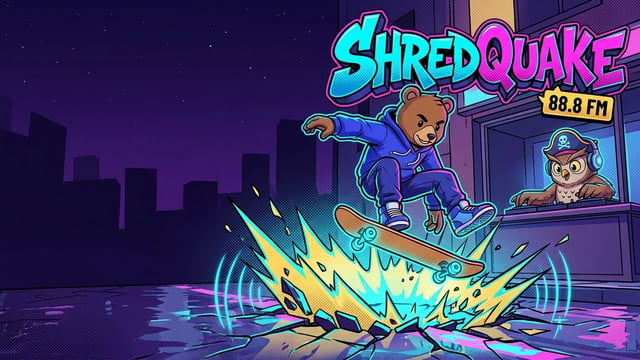
Shredquake
BlinkcadeShredquake is a fast-paced 3D cel-shaded arcade skateboarding and rhythm-runner game set in Crown City during Quiet Hours. The Commissioner and her Hush Patrol drones have banned all music and street skating after dark, so night courier Rumble and pirate radio DJ Owl-Nighter on 88.8 FM are taking the streets back one bass drop at a time.
Carve through four distinct city districts: Arcade Row, Harbor Lights, The Rooftops, and the Night Market. Pop ollies over patrol barriers, lock into metallic rail grinds, chain kickflips and 360 flips, and hold manuals to build your combo multiplier. Every jump, flip catch, rail lock, and heavy landing features realistic skateboard sound effects and camera impact so you feel every move.
When your Hype meter hits 100 percent, unleash a Shredquake—a massive bass shockwave that cracks the street and shatters every barrier and curfew drone in your path. Play through two full Story Seasons with 10 chapters and 30 missions, chase high scores in Endless mode, or compete on the same daily track in Daily Seed and Ghost Races. Unlock 6 playable skaters, 12 custom skateboard decks, 7 wheel sets, and 8 hoodies in the Locker using tokens collected on the street.
How to Play / Controls:
Desktop Keyboard Controls: Left / Right Arrow or A / D: Switch lanes and balance on rails or manuals Up Arrow, W, or Space: Ollie (hold to charge a higher jump; press in mid-air near a rail to grind) Down Arrow or S: Duck under low beams, fast-slam in mid-air, or roll a manual on landing J: Flip trick (Kickflip, Heelflip, Pop Shuvit, 360 Flip, Hardflip, Impossible) K: Grab trick (hold in mid-air) or Spin (double-tap) E or Enter: Trigger Shredquake when Hype is at 100 percent P or Escape: Pause game
Mobile and Tablet Touch Controls: Use the on-screen Touch Arcade buttons (Left, Right, Ollie, Flip, Grind, Quake) or swipe left and right to switch lanes, swipe up to ollie, swipe down to duck or slam, tap in mid-air to flip, and double-tap to trigger a Shredquake.
Gamepad Controls: Left Stick or D-Pad: Switch lanes and balance grinds or manuals Bottom Face Button (A / Cross): Ollie Left Face Button (X / Square): Flip trick Right Face Button (B / Circle): Grab, Spin, or Duck Top Face Button (Y / Triangle) or Right Bumper: Trigger Shredquake
Game details
- Released
- October 15, 2026
- Last Updated
- October 20, 2026
- Languages
- English